

This tutorial explains how to check multiple computer names at once to verify whether they exist in Active Directory (AD) using PowerShell.

Before running the script, ensure:
-
You are logged in as a user with Active Directory read permissions
-
The script is executed on:
-
A Domain Controller, or
-
A workstation with RSAT (Remote Server Administration Tools) installed
-
Computer Name List (Example)
The following computer names will be checked:
-
NB0394MY
-
NB0395MY
-
NB0396MY
-
NB0397MY
-
NB0398MY
$PCs = @(
"NB0394MY",
"NB0395MY",
"NB0396MY",
"NB0397MY",
"NB0398MY"
)

foreach ($PC in $PCs) {
if (Get-ADComputer -Filter "Name -eq '$PC'" -ErrorAction SilentlyContinue) {
Write-Host "$PC : FOUND in AD" -ForegroundColor Green
} else {
Write-Host "$PC : NOT FOUND in AD" -ForegroundColor Red
}
}
Sample result :
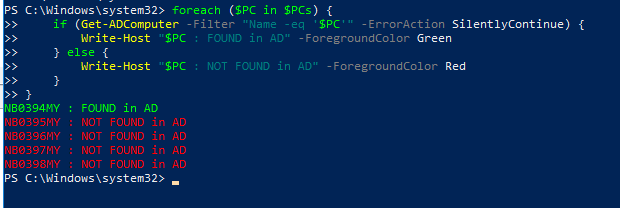
NB0394MY : FOUND in AD
NB0395MY : NOT FOUND in AD
NB0396MY : NOT FOUND in AD
NB0397MY : NOT FOUND in AD
NB0398MY : NOT FOUND in AD

